


The Unified Planning Library#
In this demo we will scratch the surface of the UP: we will set it up, we manually create the blocksworld domain using the UP API, we create a problem using a bit of python and we solve the problem using different engines and a parallel composition of engines.
Setup of the library#
For this demo, we only need the following two shell commands. The first installs libgraphviz used for the plotting of graphs, the second installs the UP library, the set of default planning engines (namely: aries, enhsp, fast-downward, fmap, lpg, pyperplan, symk and tamer) and the optional python library dependecies for plotting.
# Please note that these are included in the course container - uncomment if you want to run on colab

# !apt install graphviz graphviz-dev
# !pip install unified-planning[engines,plot]
Modeling the Blocksworld domain#
We will give a more in-detail description of the API later, here we just show a basic blocksworld domain encoded in Python using the UP API.
from unified_planning.model.types import BOOL
from unified_planning.shortcuts import *

# Create a new type (without parent)
Block = UserType("Block")

# The UP calls "fluents" both predicates and functions
# Each fluent has a type (BOOL for all fluents in this case) and might have parameters
clear = Fluent("clear", BOOL, obj=Block) # in PDDL this would be (clear ?obj - Block)
on_table = Fluent("on-table", BOOL, obj=Block)
arm_empty = Fluent("arm-empty", BOOL)
holding = Fluent("holding", BOOL, obj=Block)
on = Fluent("on", BOOL, above=Block, below=Block)

# Pickup action with one parameter a precondition formula and some effects
pickup = InstantaneousAction("pickup", obj=Block)
pickup.add_precondition(clear(pickup.obj) & on_table(pickup.obj) & arm_empty)
pickup.add_effect(holding(pickup.obj), True)
pickup.add_effect(clear(pickup.obj), False)
pickup.add_effect(on_table(pickup.obj), False)
pickup.add_effect(arm_empty, False)

# More actions...
putdown = InstantaneousAction("putdown", obj=Block)
putdown.add_precondition(holding(putdown.obj))
putdown.add_effect(holding(putdown.obj), False)
putdown.add_effect(clear(putdown.obj), True)
putdown.add_effect(on_table(putdown.obj), True)
putdown.add_effect(arm_empty, True)

stack = InstantaneousAction("stack", obj=Block, underobj=Block)
# More than one precondition can be set (implicit conjunction)
stack.add_precondition(clear(stack.underobj) & holding(stack.obj))
stack.add_precondition(Not(Equals(stack.obj, stack.underobj)))
stack.add_effect(arm_empty, True)
stack.add_effect(clear(stack.obj), True)
stack.add_effect(on(stack.obj, stack.underobj), True)
stack.add_effect(clear(stack.underobj), False)
stack.add_effect(holding(stack.obj), False)

unstack = InstantaneousAction("unstack", obj=Block, underobj=Block)
unstack.add_precondition(on(unstack.obj, unstack.underobj) & clear(unstack.obj) & arm_empty)
unstack.add_effect(holding(unstack.obj), True)
unstack.add_effect(clear(unstack.underobj), True)
unstack.add_effect(on(unstack.obj, unstack.underobj), False)
unstack.add_effect(clear(unstack.obj), False)
unstack.add_effect(arm_empty, False)

# So far we just created objects in memory, we have not yet declared a problem
# A `Problem` is a planning instance, but as a mutable object it can be partially specified
# Here we just add fluents and actions, so we represent the "domain"
problem = Problem("blocksworld")
for f in [clear, on_table, arm_empty, holding, on]:
  # We can specify arbitrary default initial values (particularly useful for numeric fluents)
  problem.add_fluent(f, default_initial_value=False)
problem.add_actions([pickup, putdown, stack, unstack])

# We can meaningfully print most UP objects for debug purposes
print(problem)
problem name = blocksworld

types = [Block]

fluents = [
  bool clear[obj=Block]
  bool on-table[obj=Block]
  bool arm-empty
  bool holding[obj=Block]
  bool on[above=Block, below=Block]
]

actions = [
  action pickup(Block obj) {
    preconditions = [
      ((clear(obj) and on-table(obj)) and arm-empty)
    ]
    effects = [
      holding(obj) := true
      clear(obj) := false
      on-table(obj) := false
      arm-empty := false
    ]
  }
  action putdown(Block obj) {
    preconditions = [
      holding(obj)
    ]
    effects = [
      holding(obj) := false
      clear(obj) := true
      on-table(obj) := true
      arm-empty := true
    ]
  }
  action stack(Block obj, Block underobj) {
    preconditions = [
      (clear(underobj) and holding(obj))
      (not (obj == underobj))
    ]
    effects = [
      arm-empty := true
      clear(obj) := true
      on(obj, underobj) := true
      clear(underobj) := false
      holding(obj) := false
    ]
  }
  action unstack(Block obj, Block underobj) {
    preconditions = [
      ((on(obj, underobj) and clear(obj)) and arm-empty)
    ]
    effects = [
      holding(obj) := true
      clear(underobj) := true
      on(obj, underobj) := false
      clear(obj) := false
      arm-empty := false
    ]
  }
]

objects = [
  Block: []
]

initial fluents default = [
  bool clear[obj=Block] := false
  bool on-table[obj=Block] := false
  bool arm-empty := false
  bool holding[obj=Block] := false
  bool on[above=Block, below=Block] := false
]

initial values = [
]

goals = [
]
Modeling a simple problem#
We create a simple problem showing how to use python “data”. We create a problem where the goal is to stack 6 blocks labeled “m”, “e”, “d”, “o” to form the word “demo” (where “d” is on top and “o” is on the table).

str_goal = "demo" # this is the "python data"

# we create the 6 objects programmatically
objects = [Object(x, Block) for x in str_goal]
problem.add_objects(objects)

# Set the initial state (all fluents are false by default because of the domain specification)
problem.set_initial_value(arm_empty, True)
for o in objects:
  problem.set_initial_value(on_table(o), True)
  problem.set_initial_value(clear(o), True)

# Set the goal
base = objects[0]
for o in objects[1:]:
  problem.add_goal(on(base, o))
  base = o

# Print the full planning instance
print(problem)
problem name = blocksworld

types = [Block]

fluents = [
  bool clear[obj=Block]
  bool on-table[obj=Block]
  bool arm-empty
  bool holding[obj=Block]
  bool on[above=Block, below=Block]
]

actions = [
  action pickup(Block obj) {
    preconditions = [
      ((clear(obj) and on-table(obj)) and arm-empty)
    ]
    effects = [
      holding(obj) := true
      clear(obj) := false
      on-table(obj) := false
      arm-empty := false
    ]
  }
  action putdown(Block obj) {
    preconditions = [
      holding(obj)
    ]
    effects = [
      holding(obj) := false
      clear(obj) := true
      on-table(obj) := true
      arm-empty := true
    ]
  }
  action stack(Block obj, Block underobj) {
    preconditions = [
      (clear(underobj) and holding(obj))
      (not (obj == underobj))
    ]
    effects = [
      arm-empty := true
      clear(obj) := true
      on(obj, underobj) := true
      clear(underobj) := false
      holding(obj) := false
    ]
  }
  action unstack(Block obj, Block underobj) {
    preconditions = [
      ((on(obj, underobj) and clear(obj)) and arm-empty)
    ]
    effects = [
      holding(obj) := true
      clear(underobj) := true
      on(obj, underobj) := false
      clear(obj) := false
      arm-empty := false
    ]
  }
]

objects = [
  Block: [d, e, m, o]
]

initial fluents default = [
  bool clear[obj=Block] := false
  bool on-table[obj=Block] := false
  bool arm-empty := false
  bool holding[obj=Block] := false
  bool on[above=Block, below=Block] := false
]

initial values = [
  arm-empty := true
  on-table(d) := true
  clear(d) := true
  on-table(e) := true
  clear(e) := true
  on-table(m) := true
  clear(m) := true
  on-table(o) := true
  clear(o) := true
]

goals = [
  on(d, e)
  on(e, m)
  on(m, o)
]
OneshotPlanner Operation Mode#
Solving the problem with any engine#
The UP can analyze a problem specification and filter the engines that can solve a certain problem. It does so by a data structure called ProblemKind (more on this later).
We can inspect the ProblemKind of a problem by using the kind property.
print(problem.kind)
PROBLEM_CLASS: ['ACTION_BASED']
CONDITIONS_KIND: ['NEGATIVE_CONDITIONS', 'EQUALITIES']
TYPING: ['FLAT_TYPING']
We can ask the UP to solve the problem using any suitable engine (a preference list is provided, a user can edit it programmatically or provide a custom configuation file: https://unified-planning.readthedocs.io/en/latest/engines.html#engine-selection-and-preference-list).
OneshotPlanner is the basic planning operation mode: given a problem find a plan
# Ask the UP to instantiate for us a "oneshot" planner supporting our problem kind
with OneshotPlanner(problem_kind=problem.kind) as planner:
  res = planner.solve(problem)
  print(res)
NOTE: To disable printing of planning engine credits, add this line to your code: `up.shortcuts.get_environment().credits_stream = None`
  *** Credits ***
  * In operation mode `OneshotPlanner` at line 2 of `/tmp/ipykernel_998726/4034772928.py`, you are using the following planning engine:
  * Engine name: Fast Downward
  * Developers:  Uni Basel team and contributors (cf. https://github.com/aibasel/downward/blob/main/README.md)
  * Description: Fast Downward is a domain-independent classical planning system.

status: SOLVED_SATISFICING
engine: Fast Downward
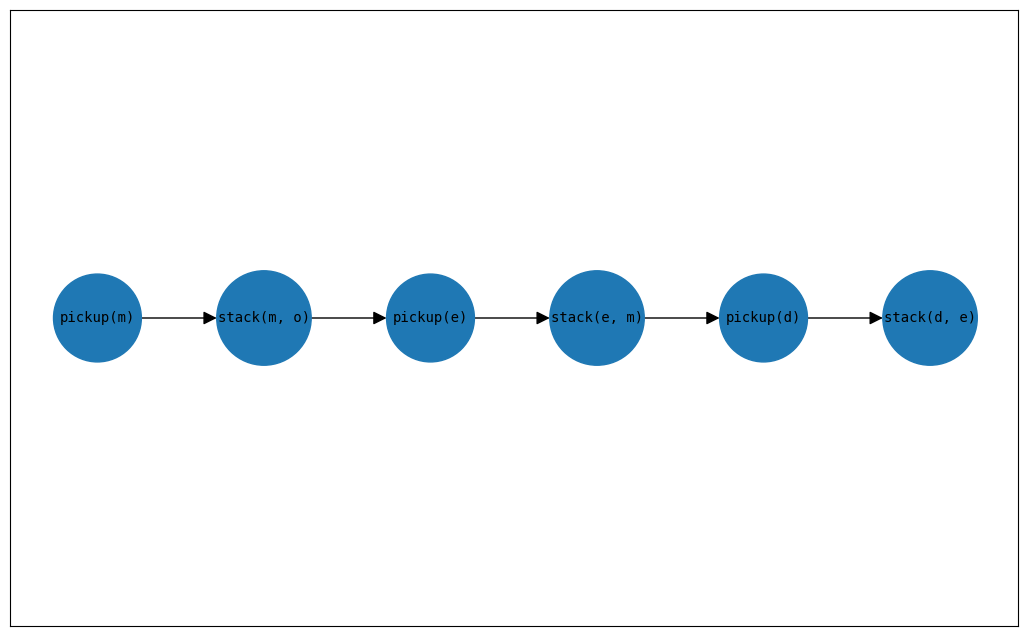
plan: SequentialPlan:
    pickup(m)
    stack(m, o)
    pickup(e)
    stack(e, m)
    pickup(d)
    stack(d, e)
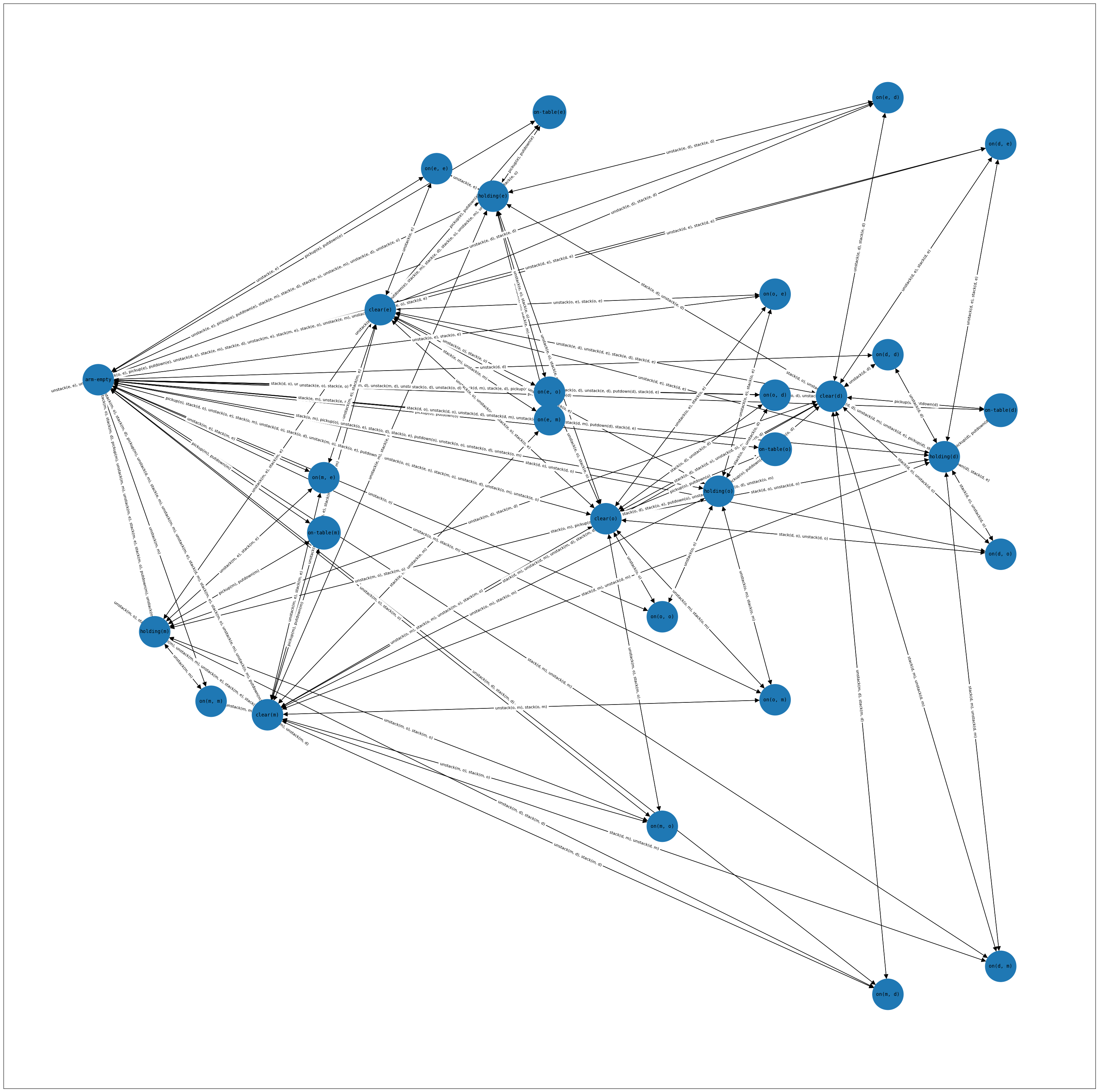
The unified_planning.plot package provides useful functions to visually plot many objects
import unified_planning.plot as plt

plt.plot_causal_graph(problem=problem,figsize=(40,40))
plt.plot_plan(res.plan)
  *** Credits ***
  * In operation mode `Compiler` at line 136 of `/home/vscode/.local/lib/python3.8/site-packages/unified_planning/plot/causal_graph_plot.py`, you are using the following planning engine:
  * Engine name: Tarski grounder
  * Developers:  Artificial Intelligence and Machine Learning Group - Universitat Pompeu Fabra
  * Description: Tarski grounder, more information available on the given website.
Specifying the engine name#
We can also explicitly specify the name of the engine we want to use (and optionally custom parameters). The interface, after the openation mode is identical.
with OneshotPlanner(name="lpg") as planner:
  res = planner.solve(problem)
  print(res)
  *** Credits ***
  * In operation mode `OneshotPlanner` at line 1 of `/tmp/ipykernel_998726/719035379.py`, you are using the following planning engine:
  * Engine name: LPG
  * Developers:  UNIBS Team
  * Description: LPG is a planner based on local search and planning graphs.

status: SOLVED_SATISFICING
engine: lpg
plan: SequentialPlan:
    pickup(d)
    stack(d, e)
    pickup(m)
    stack(m, o)
    unstack(d, e)
    putdown(d)
    pickup(e)
    stack(e, m)
    pickup(d)
    stack(d, e)
/home/vscode/.local/lib/python3.8/site-packages/unified_planning/engines/mixins/oneshot_planner.py:76: UserWarning: We cannot establish whether lpg can solve this problem!
  warn(msg)
Parallel solving#
We can even execute more than one planner in parallel and use this “parallel portfolio” as a normal planner.
with OneshotPlanner(names=["tamer", "fast-downward"]) as planner:
  res = planner.solve(problem)
  print(res)
  *** Credits ***
  * In operation mode `OneshotPlanner` at line 1 of `/tmp/ipykernel_998726/1972089550.py`, you are using a parallel planning engine with the following components:
  * Engine name: Tamer
  * Developers:  FBK Tamer Development Team
  * Description: Tamer offers the capability to generate a plan for classical, numerical and temporal problems.
  *              For those kind of problems tamer also offers the possibility of validating a submitted plan.
  * Engine name: Fast Downward
  * Developers:  Uni Basel team and contributors (cf. https://github.com/aibasel/downward/blob/main/README.md)
  * Description: Fast Downward is a domain-independent classical planning system.

status: SOLVED_SATISFICING
engine: Tamer
plan: SequentialPlan:
    pickup(m)
    stack(m, o)
    pickup(e)
    stack(e, m)
    pickup(d)
    stack(d, e)
The interface is the same!#
All engines supporting an OperationMode are required to support the same interface and being interchangeable.
all_applicable_planners = get_all_applicable_engines(problem_kind=problem.kind, operation_mode=OperationMode.ONESHOT_PLANNER)
print(all_applicable_planners)
['fast-downward', 'fast-downward-opt', 'symk', 'symk-opt', 'enhsp', 'enhsp-opt', 'enhsp-any', 'tamer', 'aries', 'oversubscription[fast-downward]', 'oversubscription[fast-downward-opt]', 'oversubscription[symk]', 'oversubscription[symk-opt]', 'oversubscription[enhsp]', 'oversubscription[enhsp-opt]', 'oversubscription[enhsp-any]', 'oversubscription[tamer]', 'oversubscription[aries]']
for pname in all_applicable_planners:
  with OneshotPlanner(name=pname) as planner:
    res = planner.solve(problem)
    print(res)
  *** Credits ***
  * In operation mode `OneshotPlanner` at line 2 of `/tmp/ipykernel_998726/3657586449.py`, you are using the following planning engine:
  * Engine name: Fast Downward
  * Developers:  Uni Basel team and contributors (cf. https://github.com/aibasel/downward/blob/main/README.md)
  * Description: Fast Downward is a domain-independent classical planning system.

status: SOLVED_SATISFICING
engine: Fast Downward
plan: SequentialPlan:
    pickup(m)
    stack(m, o)
    pickup(e)
    stack(e, m)
    pickup(d)
    stack(d, e)
  *** Credits ***
  * In operation mode `OneshotPlanner` at line 2 of `/tmp/ipykernel_998726/3657586449.py`, you are using the following planning engine:
  * Engine name: Fast Downward
  * Developers:  Uni Basel team and contributors (cf. https://github.com/aibasel/downward/blob/main/README.md)
  * Description: Fast Downward is a domain-independent classical planning system.

status: SOLVED_SATISFICING
engine: Fast Downward (with optimality guarantee)
plan: SequentialPlan:
    pickup(m)
    stack(m, o)
    pickup(e)
    stack(e, m)
    pickup(d)
    stack(d, e)
  *** Credits ***
  * In operation mode `OneshotPlanner` at line 2 of `/tmp/ipykernel_998726/3657586449.py`, you are using the following planning engine:
  * Engine name: SymK
  * Developers:  David Speck (cf. https://github.com/speckdavid/symk/blob/master/README.md )
  * Description: SymK is a state-of-the-art domain-independent optimal and top-k planner.

status: SOLVED_SATISFICING
engine: SymK
plan: SequentialPlan:
    pickup(m)
    stack(m, o)
    pickup(e)
    stack(e, m)
    pickup(d)
    stack(d, e)
  *** Credits ***
  * In operation mode `OneshotPlanner` at line 2 of `/tmp/ipykernel_998726/3657586449.py`, you are using the following planning engine:
  * Engine name: SymK
  * Developers:  David Speck (cf. https://github.com/speckdavid/symk/blob/master/README.md )
  * Description: SymK is a state-of-the-art domain-independent optimal and top-k planner.

status: SOLVED_SATISFICING
engine: SymK (with optimality guarantee)
plan: SequentialPlan:
    pickup(m)
    stack(m, o)
    pickup(e)
    stack(e, m)
    pickup(d)
    stack(d, e)
  *** Credits ***
  * In operation mode `OneshotPlanner` at line 2 of `/tmp/ipykernel_998726/3657586449.py`, you are using the following planning engine:
  * Engine name: ENHSP
  * Developers:  Enrico Scala
  * Description: Expressive Numeric Heuristic Search Planner.
---------------------------------------------------------------------------
FileNotFoundError                         Traceback (most recent call last)
Cell In[9], line 3
      1 for pname in all_applicable_planners:
      2   with OneshotPlanner(name=pname) as planner:
----> 3     res = planner.solve(problem)
      4     print(res)

File ~/.local/lib/python3.8/site-packages/unified_planning/engines/mixins/oneshot_planner.py:80, in OneshotPlannerMixin.solve(self, problem, heuristic, timeout, output_stream)
     78     msg = f"The problem has no quality metrics but the engine is required to be optimal!"
     79     raise up.exceptions.UPUsageError(msg)
---> 80 return self._solve(problem, heuristic, timeout, output_stream)

File ~/.local/lib/python3.8/site-packages/unified_planning/engines/pddl_planner.py:193, in PDDLPlanner._solve(self, problem, heuristic, timeout, output_stream)
    187     cmd = self._get_anytime_cmd(
    188         domain_filename, problem_filename, plan_filename
    189     )
    190 if output_stream is None:
    191     # If we do not have an output stream to write to, we simply call
    192     # a subprocess and retrieve the final output and error with communicate
--> 193     process = subprocess.Popen(
    194         cmd, stdout=subprocess.PIPE, stderr=subprocess.PIPE
    195     )
    196     timeout_occurred: bool = False
    197     proc_out: List[str] = []

File /usr/lib/python3.8/subprocess.py:858, in Popen.__init__(self, args, bufsize, executable, stdin, stdout, stderr, preexec_fn, close_fds, shell, cwd, env, universal_newlines, startupinfo, creationflags, restore_signals, start_new_session, pass_fds, encoding, errors, text)
    854         if self.text_mode:
    855             self.stderr = io.TextIOWrapper(self.stderr,
    856                     encoding=encoding, errors=errors)
--> 858     self._execute_child(args, executable, preexec_fn, close_fds,
    859                         pass_fds, cwd, env,
    860                         startupinfo, creationflags, shell,
    861                         p2cread, p2cwrite,
    862                         c2pread, c2pwrite,
    863                         errread, errwrite,
    864                         restore_signals, start_new_session)
    865 except:
    866     # Cleanup if the child failed starting.
    867     for f in filter(None, (self.stdin, self.stdout, self.stderr)):

File /usr/lib/python3.8/subprocess.py:1704, in Popen._execute_child(self, args, executable, preexec_fn, close_fds, pass_fds, cwd, env, startupinfo, creationflags, shell, p2cread, p2cwrite, c2pread, c2pwrite, errread, errwrite, restore_signals, start_new_session)
   1702     if errno_num != 0:
   1703         err_msg = os.strerror(errno_num)
-> 1704     raise child_exception_type(errno_num, err_msg, err_filename)
   1705 raise child_exception_type(err_msg)

FileNotFoundError: [Errno 2] No such file or directory: 'java'